CSV & JSONL Export
Export your full post history — every post, every engagement count, every hashtag — as a CSV or JSONL file with no row limits.
How it works
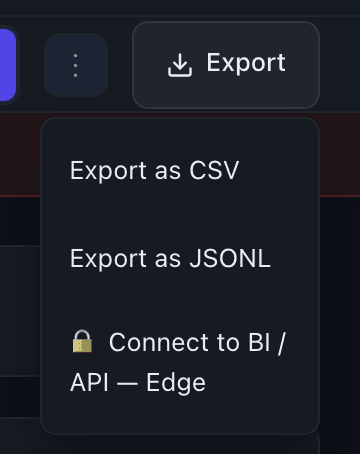
Click the Export button in the dashboard header. A file downloads immediately to your browser — no email, no waiting. By default you get a CSV; switch to JSONL in the format selector if you prefer newline-delimited JSON.
You can also export from Collections: open any collection and use its export control to download just the posts in that collection.
What's in the file
Profile export CSV columns:
| Column | Description |
|---|---|
post_url | Direct link to the post on LinkedIn |
published_at | ISO 8601 publish timestamp |
text_content | Full post text |
likes | Like count |
comments | Comment count |
shares | Share count |
total_engagement | Sum of likes + comments + shares |
post_type | e.g. text, image, video, article |
has_images | true / false |
character_count | Character length of post text |
hashtags | Semicolon-separated list |
reaction_types | JSON object of per-reaction-type counts |
When you export multiple profiles at once (Edge plan), a leading profile column identifies which row belongs to which profile.
Collection export includes the same columns plus a collection_name column and a source_type column indicating how the post was added to the collection.
JSONL outputs one JSON object per line with the full post record. Use this when piping into scripts, importing into Clay, or feeding into an LLM workflow.
Key details
- No row cap — every post Flux has scraped for your profile is included.
- Excel and Sheets compatible — commas, quotes, and newlines inside post text are properly escaped.
- Filename format:
flux-export-YYYY-MM-DD.csvfor profile exports;flux-collection-<name>-YYYY-MM-DD.csvfor collection exports. - The export reflects data as of your last scrape. See Data Refresh for how often data updates.
Tips
- For client reporting: CSV drops cleanly into Google Sheets or Notion databases. The
total_engagementcolumn is ready to chart without any formula work. - For CRM or sequencer import: export a Collection you've built around a prospect or competitor, then import the CSV directly into your tool of choice.
- For scripting: JSONL works well with
jq, Python'sjsonmodule, or any tool that processes line-by-line input — no need to parse a full JSON array.